Fixing Manjaro Boot Menu
·1 min
I was fed up of Windows update erasing my grub entries. So I have documented the steps to fix it, the steps which works for me. I hope it helps me when I lost my grub bootloader again.
I was fed up of Windows update erasing my grub entries. So I have documented the steps to fix it, the steps which works for me. I hope it helps me when I lost my grub bootloader again.
With incidents such as Australian bush fire, Covid-19 Pandemic and civil unrest in many countries over one reason or the other, 2020 is basically proving to be one long nightmare. To make it worse for me, my server got hacked, majorly due to lack of proper security or a bad WordPress vulnerability (To put it in the words of Einstein, mildly, human stupidity has no limit).
So I decided to migrate the server to a new one and this time decided to invest some time in making it more secure. This guide is basically a document to setup such a server to host WordPress sites with as much security hardening as I possibly can do. 2020, bring it on!
So there I was, trying to find best color combination for making my VBA editor in dark theme. While I did find an open source utility on GitHub to hack the VBE.dll and then replace it in the system, I simply wanted to know a color combination that I can quickly set in the built in VBA color palette editor so that I can make the editor dark.
If you have your own site, encrypting is something that should be mandatory. Not only does it makes your site secure against hackers/crackers but also google rank those sites higher who serve their site on https.
Here’s how you can secure your wordpress based site using certificate provide by Lets Encrypt.
I am quoting the following direct from the Let’s Encrypt site:
To enable HTTPS on your website, you need to get a certificate (a type of file) from a Certificate Authority (CA). Let’s Encrypt is one such CA. In order to get a certificate for your website’s domain from Let’s Encrypt, you have to demonstrate control over the domain. With Let’s Encrypt, you do this using software that uses the ACME protocol, which typically runs on your web host.
If you have shell access (that is if you can connect to your host using PuTTY), you can follow the instructions provided here to install certbot.
Assuming your wordpress site runs on nginx web server on Debian 9, here’s how to do it:
Add the repository source in your sources.list:
deb http://ftp.debian.org/debian stretch-backports main
to your /etc/apt/sources.list (or add a new file with the “.list” extension to /etc/apt/sources.list.d/)
If I remember correctly I was first introduced to WhatsApp as early as 2012 by one of my IRL friend. It was the thing which was “in” at the time. But it wasn’t that well known. Adoption of WhatsApp spread like wildfire since then, and now in 2018, it’s like everyone who have a smartphone have WhatsApp on their phone. Heck, even the non smartphone, like Symbian have a WhatsApp client now. What started of as a small project in 2009 by Brian Acton and Jan Koum, both former employees of Yahoo, in Mountain View, California, soon grew to be a company worthy to be acquired by the Facebook giant in 2014. The acquisition took just US $19 billion out of Facebook’s pockets, but Zuckerberg knew it was a bargain.
The USP of WhatsApp was it’s simplicity and ad free experience. The founders promised that it will remain ad free for eternity but never promised anything about simplicity. After being bought by Facebook, WhatsApp went numerous changes which traded the simplicity to introduce features like Instagram, which was another social network app company acquired by Facebook in 2012 earlier for mere 1 billion (sounds like a steal in comparison to WhatsApp deal now, isn’t it?).
In this article I am documenting the exact steps that one needs to host a wordpress based site on a Debian based virtual machine (VM). I choose debian since that’s one of the preferred distro based on it’s stability and smaller footprint on resources compared to Ubuntu. But you may very well choose Ubuntu, only some steps in below documentation would differ.
This article deals with following technologies:
So I had a Moto E that was showing weird issues. Sometimes when it’s rebooted it stucks in bootloop and fails to finish the boot sequence. The home screen just doesn’t appear. I manage to flash a fresh ROM on it and after which it starts to work. I haven’t been able to identify the problem yet, but the turnaround is working good as of now. So I just want to document the process of fixing the soft bricked Moto E:
*** DISCLAIMER ***
Please note that this is just a documentation of the process I followed to fix my Moto E. This is by no means an accurate or official guide to fix your Moto E. If you do mess up your phone trying to follow this documentation, you can't blame me.
The simple procedure for a fresh Moto E is to first unlock the bootloader of Moto E. Which is a simple one time process which includes using the following command in fastboot mode: fastboot oem get_unlock_data. The unlock is complete when you enter a code on Motorola website and they give you a return string to unlock it. The guide is [here][1].
This article lists a few ways to analyze the usage space of the hard disk through Terminal.
sudo du -h * | sort -h
The command ‘du’ is used in terminal which stands for disk usage. But the command alone gives listing of all files along with their size. The above command sorts the list, so that the highest space folder appears in bottom of the list. SUDO added since if you want it to run in root folder, normal command won’t have access to system folders.
With all the advances that have happened in the world of Internet, one thing is at the core of it. That is Instant Communication. And from the ages of Internet Chat Relays (IRC) to WhatsApp and everything in between is playing a pivotal role in connecting people from all corners of the globe. And if you are confused as to what Instant Messenger is right for you, here is a flowchart that lets you decide between few of them.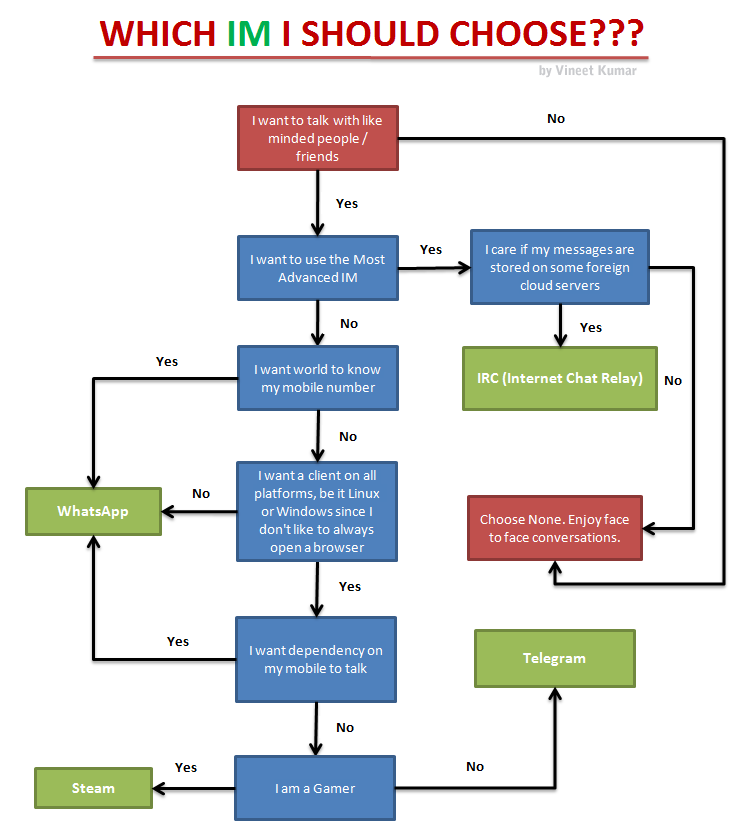
WhatsApp: Everyone uses it since everyone else uses it. But things such as dependency on mobile even if you want to chat on browser makes it a very poorly developed IM.
IRC (Internet Chat Relay): It’s the most powerful IM that the netizens have ever used. You can chat privately, in rooms, on PC, on your phone, use bots, leave offline messages.. really the only limit is your imagination and skills to make more functionality.
Steam: Steam being the most popular client for gaming provides a client for both Windows, Linux and Android. So if you are a gamer you would tend to use it much extensively.
Telegram: It’s currently the most versatile IM as of now. With features such as true cross platform (you can run it on command line!), ability to share self expiring secret messages, cloud storage (so that you don’t loose your chat history) and with the introduction of bots, I am in love with this IM. Also the fact that you don’t need to share your mobile number like WhatsApp makes it perfect for privacy conscious users.
So which IM you use the most and what would be your choice, if you don’t have to come under peer pressure to choose more popular Instant Messenger?
I use to have a hard time configuring a new site under a common VPS. So I decided to document the steps for easy reference in future.
Following are the steps to add a new site “site-name.com” under a new user account “username” on your Linux VPS. This is to note that this works if you have the following web service solution stack (LAMP):
Linux OS : Debian
Web server: Nginx (Not Apache)
Database: MySQL
Application Programming Language: PHP
So here we go:
sudo adduser username
This command also creates a new home directory for the user.