Blog

2015


Pusa Hill Forest

·1 min

Last weekend my friend Ankur wanted to pay Pusa Hill Forest a visit. This is located at little far from the nearest Metro station of Jhandewalan. The forest is spread along the Vandematram road. Here’s the 360º Panorama taken from Google Camera taken in the forest.

Continue Reading →

Predestination (Spoilers)

·8 mins

I was able to watch Predestination few days ago and the movie was every bit I was expecting. I started to draft this blog, but it took me a while to complete.
Maybe the cause of my fixation with Time Travel and having been read a lot about Time Paradoxes, I understood the “main plot” in one shot. Heck, I would even say that the movie felt a little slow even if it was clocked around 90 min, for what was it worth. But the reason why I put “main plot” in quotes is that while the plot is crystal clear in my mind, to be able to write this post, I watched it again just so to note more details that I may have missed the first time.
The least you know about Predestination more you will enjoy it. Hence this article isn’t actually a review but an analysis of the movie’s plot. Needless to say, if you are into Time Travel movies, it’s best to watch the movie first and then come back here in case you need to know what actually happened in the movie.

Continue Reading →

Rail Museum

·1 min

Few days back I went to the Rail Museum in Delhi. It has a collection of many models of the rain engine that use to run on Indian rail platforms. Following are some 360º panorama from Google Camera. (Best enjoyed in Full Screen mode, click the Full Screen icon from within the Panorama).

Model of a platform inside the museum: #

Click here to open this in Full Screen.

Continue Reading →

Park near Bhuli Bhatiyari Ka Mahal

·1 min

Recently I went to a location called “Bhuli Bhatiyari ka Mahal”. This is located in Central Ridge Reserve Forest, walking distance from the nearest Metro station of Jhandewalan. Here’s the 360º Panorama taken from Google Camera.

Continue Reading →

Making Ubuntu Personalized with GNOME

·5 mins

Until now we got familiar with Ubuntu and know how to install updates and softwares, as well as know how to use a few commands using Terminal. And now that we know what is Unity and the Unity bar, it’s time to dump it! Seriously, there are cooler alternatives out there. One such alternative is GNOME. GNOME was native part of Ubuntu until a few versions ago. But Canonical switched it for Unity later. And while Unity may provide a very good shell I don’t think it’s on par with modern era.
In this guide I will install GNOME  and write about how to customize it with extensions.

GNOME: #

GNOME shell provides a fully customized UI on top of Ubuntu. Consider a shell akin to a completely new theme in Windows, except, shell is much more than just a theme. It actually is a complete Desktop Environment (DE) and contains completely different and sometimes a unique set of features which other shell lacks.
Unlike Windows, you can  choose to use any DE right before you login from the login page. So while one user might be using Unity, you on the same Ubuntu can use GNOME. I should warn though that GNOME is a little heavy on resources than Unity, but it’s beautiful and that there are some sacrifices which have to be made for “elegance”. Without wasting more time lets just install GNOME and see it in action.
To install GNOME run following command on Terminal (again Ctrl + Shift + T) while entering password when asked:

sudo apt-get install gnome

This will install a bunch of packages (around 500 MBs) which are included in GNOME by default.
Continue Reading →

Ubuntu: Updating and Setting up Softwares

·7 mins

In my last article I wrote about my first impressions of freshly installed Ubuntu 14.04 and shared what I knew about Unity interface which Ubuntu comes bundled with. Today I am going to update the OS and install various softwares. You can follow the steps to replicate the same on your copy of the OS or skip a few steps as per your requirements.
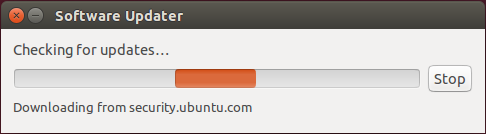
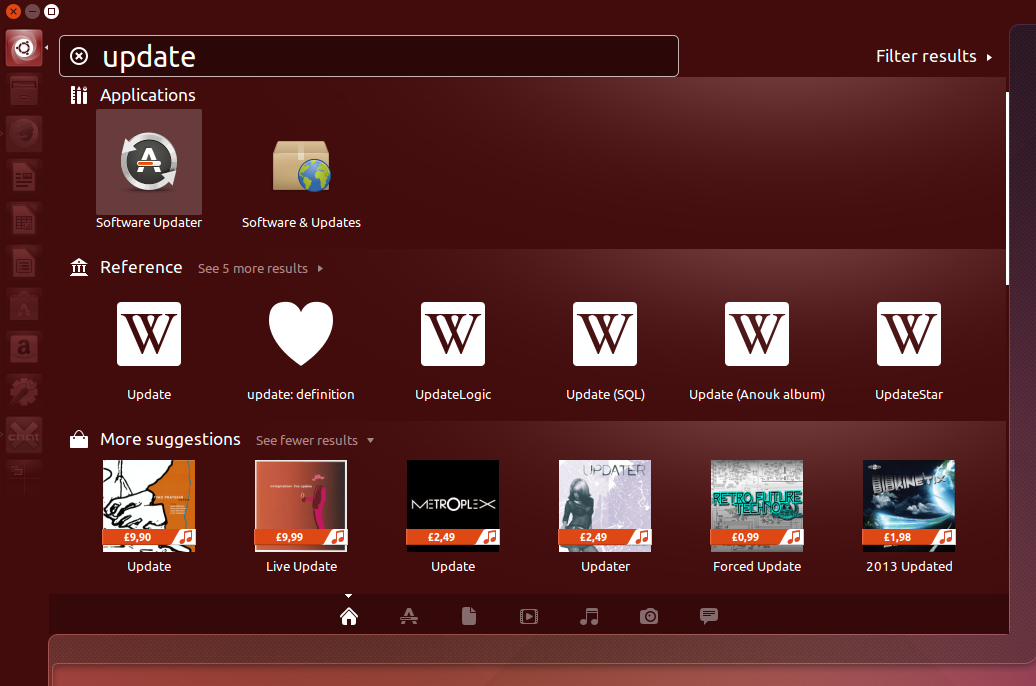
Installing updates is the first thing which one should do after installing a fresh copy of Ubuntu. Updates may include feature enhancement or security bugs. There are two methods to update Ubuntu. For first you can press “Dash Home” button on top of the Unity bar and type update, then select “Software Updater“.

Software Updater
Software Updater
[Software Updater Checking for Updates][1]
Software Updater Checking for Updates

This would check for updates and give you an option to install the updates right away. But there’s no fun in that. And I on the other hand will use more traditional way to update my OS…

Continue Reading →

Ubuntu: The Stage is Set

·5 mins

So we have installed Ubuntu in a Virtual Environment and know that some (or a lot) of the things in Ubuntu differs from windows, like filesystem and how removable drive works. In this article I will be starting from a fresh install of Ubuntu and try to get familiar with the User Interface. In the upcoming post I will proceed to set it up with softwares and settings.
I will literally be writing this article “while” I am using my PC, so this is not just a guide but more of a walk-through. Hence, please excuse my remarks which I sometimes make to emphasize my excitement (or disappointment) when I discover something.
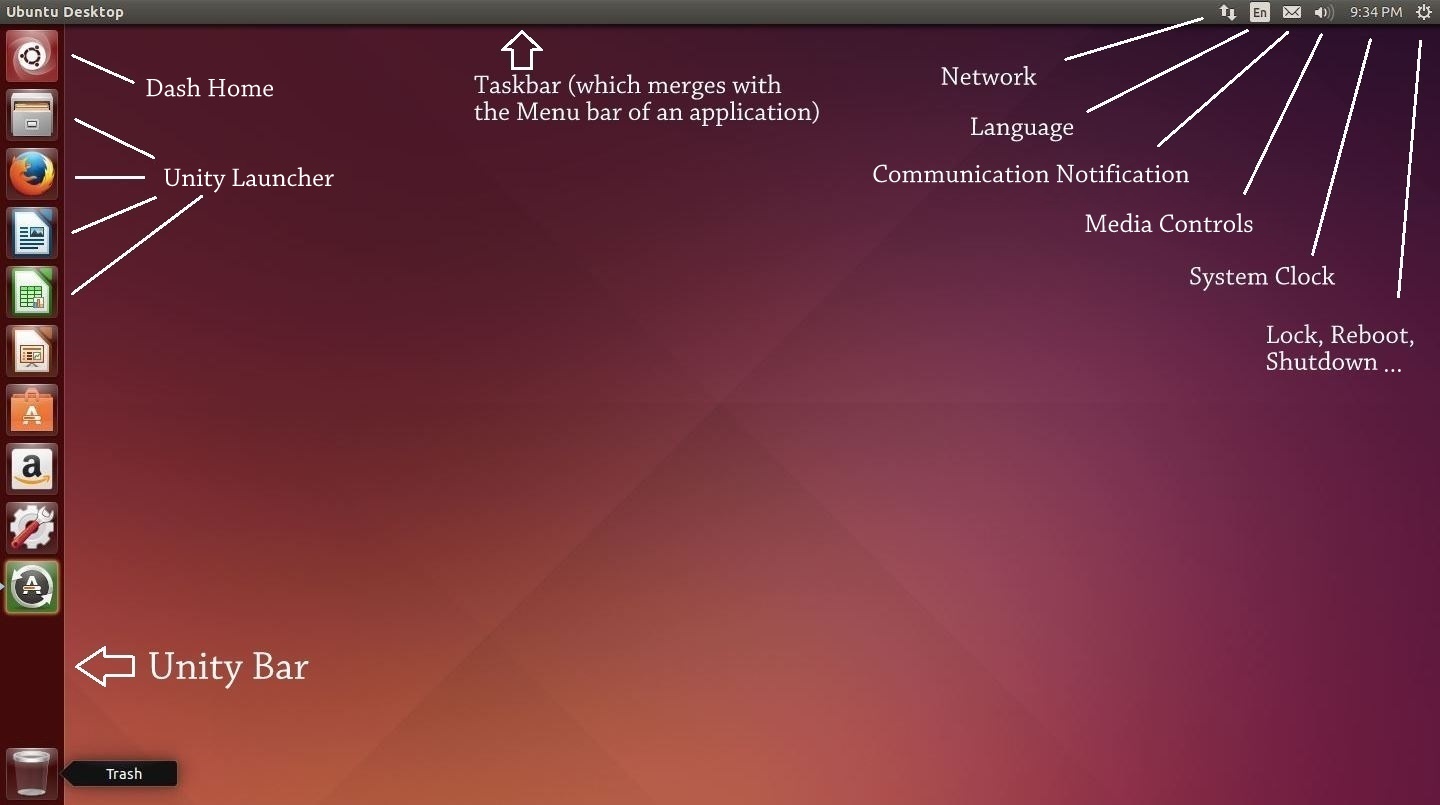
Here’s what a freshly booted Ubuntu looks like:

Freshly booted Ubuntu

We can notice a few things now:

  1. The taskbar is above the screen. It have the text “Ubuntu Desktop” written in right side of the taskbar. It also includes some icons on the top right corner including a clock and an icon on extreme right which looks like “Settings” icon.
  2. Unity bar which runs across the left side of the desktop, containing some icons of softwares like Firefox, Libre Office and System Settings. You will also notice an icon of Recycle bin down below.
  3. Rest of the screen is just plain desktop with no other stuff than default Orange wallpaper.

Now that we know about these three things, we would like to know how does these differ in functionality. Nice! Now we are getting into the good stuff …

Continue Reading →

Ugly – A not so ugly film

·3 mins

I use to watch a few Bollywood movies. And then I saw Ugly from Anurag Kashyap. What followed next were a lot of surprises and regrets.
I was surprised since I never expected such a movie to be coming out from today’s Indian cinemas, and regret since I have seen very few movies of Kashyap’s movie before and none from the recent times!
Quoting from IMDb,

Continue Reading →

Stuff I do in Windows that needs an alternative in Linux

·3 mins

In my previous post I said I would be looking an alternative in Linux for everything I do in Windows. Here’s an initial list of the applications that I am finding an alternative to. I would be updating this post fairly regularly, adding more things to the list and their alternatives, until I am confident that I can plan to make Ubuntu as my primary OS.
 

Continue Reading →

The Theory of Everything

·4 mins

A lot of time have passed since I last wrote a good movie review and after I watched Theory of Everything, I had this urge to write that I couldn’t contain.
The Theory of Everything is a biographical  movie which tells the story about the romantic side of Stephen Hawking and his relationship with his first wife, mostly unknown to the general public including me. Movies like this (based on some living legendary person) always feels a little diplomatic (like The Social Network) but are still, for the lack of a better word, interesting and also motivational.
In my teenage years I use to love all those documentaries on Discovery about theories with mind bending possibilities. It always use to take me to amazing realm of a world that remains invisible to the naked eye. Hence it was natural that I was expecting to be dazzled yet again and experience that once again on big screen. But what I saw actually was the story of him before he become a successful physicist. The movie is a story not about his professional work rather it’s solely focused on the personal life of Stephen Hawking. We got to know about how incredibly nice Jane (his first wife) was with Stephen. She was an incredible woman to sacrifice so much of her life for the love she had for Stephen. Her devotion towards Hawking for so many years was rather unparalleled.
I was expecting a cameo of real Stephen Hawking in the movie, but Eddie Redmayne, the actor who played Stephen did such an incredible job that the cameo wasn’t really missed. I haven’t watched other works of Redmayne but the portrayal of him as Hawking really transpired my imagination and felt like it was the real Hawking himself on the screen. The wife of Hawking was acted by Felicity Jones who was also good. Involvement of David Thewlis was a little distracting at first since I was used to see him as Lupin in Harry Potter movies. Guess what, he is a professor in this movie too and hence I didn’t find it out of character.
Anyone who have read the Marriages subsection on Wikipedia had already read the whole plot of this movie, since the story is consistent with what was shown on screen.
In a nutshell, The Theory of Everything is a Romantic and emotional film that grips you till the end, except when in second half you realize it’s not just a romantic film, but a Biography first. Even though having interest in Cosmology and Physics, I enjoyed the film very much. I got to know the personal side of his personality, about the man I have always adored as a cosmologist.
If I could reverse the time, I would still watch this film  and probably love it again.
Now, here are some Fun facts which I came to know after some research (no spoilers):

Continue Reading →